Moon VPN
- 4.5
- Rating
- 1.00M
- Installs
- Free
- Price

 Analysis by App-foxy
If you are new to VPN apps, Moon VPN is the kind of tool that aims to keep the first experience simple: install it, choose a US server, connect, and browse with the VPN active. I found its appeal less in a long list of advanced controls and more in the straightforward promise of private browsing and unlimited access without a subscription price. It is a free tools app from Azul Software, rated for Everyone, and it runs on Android devices using version 6.0 or later.
That simplicity matters because VPN terminology can make a basic privacy task feel more complicated than it needs to be. A VPN creates an encrypted connection between your device and the VPN service, so the websites you visit see the VPN connection rather than your usual network route. It does not make you invisible, and it does not turn unsafe websites into safe ones, but it can be useful when you are connected to a network you do not fully trust.
My first impression is that Moon VPN is best understood as an everyday connection switch, not as a complete security suite. If you want to quickly use a US server while travelling, reduce exposure on public Wi-Fi, or browse without relying directly on the network you are using, it has a clear purpose. If you need a large choice of countries, detailed protocol controls, or specialist privacy tools, you should approach it with more modest expectations.
You May Also Like

 Blood Strike: 2.5 Anniversary
Blood Strike’s Loadouts Turn Every Drop Into a Tactical Gamble
A close look at Blood Strike’s custom loadouts: how fast access to signature weapons reshapes its battle royale rhythm, rewards preparation, and narrows the gap between fights.

 Pandora - Music & Podcasts
Pandora’s Music Is Easy to Start, but Harder to Recover
Pandora’s strength is its low-effort path from a seed to a station. Its weak spot is how much confidence it asks you to place in connection, setup, and quiet recovery.

 8 Ball Pool
 Is Built on Rivalries, Rematches, and Routine
A close look at the rivalries, rematches, shared routines, and unanswered safety questions that turn a quick pool match into a persistent mobile community.

 Samsung Music
’s Quiet Strength Is Playing What You Already Own
Its reach comes less from spectacle than from dependable access to a personal library. That simplicity is both the app’s strongest retention engine and its ceiling.

 AccuWeather: Weather Radar
AccuWeather Review: A Quick, Clear Forecast for Everyday Decisions
For everyday plans, the best forecast is the one you can understand quickly. AccuWeather makes rain timing, radar, and local conditions easy to act on, with a few trade-offs.

 Hill Climb Racing
Why Hill Climb Racing Still Turns Crashes Into One More Run
A tiny car, a bumpy hill and one more upgrade: Hill Climb Racing keeps resurfacing because its simple chaos makes every near-miss feel personal.
More From Our News Desk



What to expect before connecting
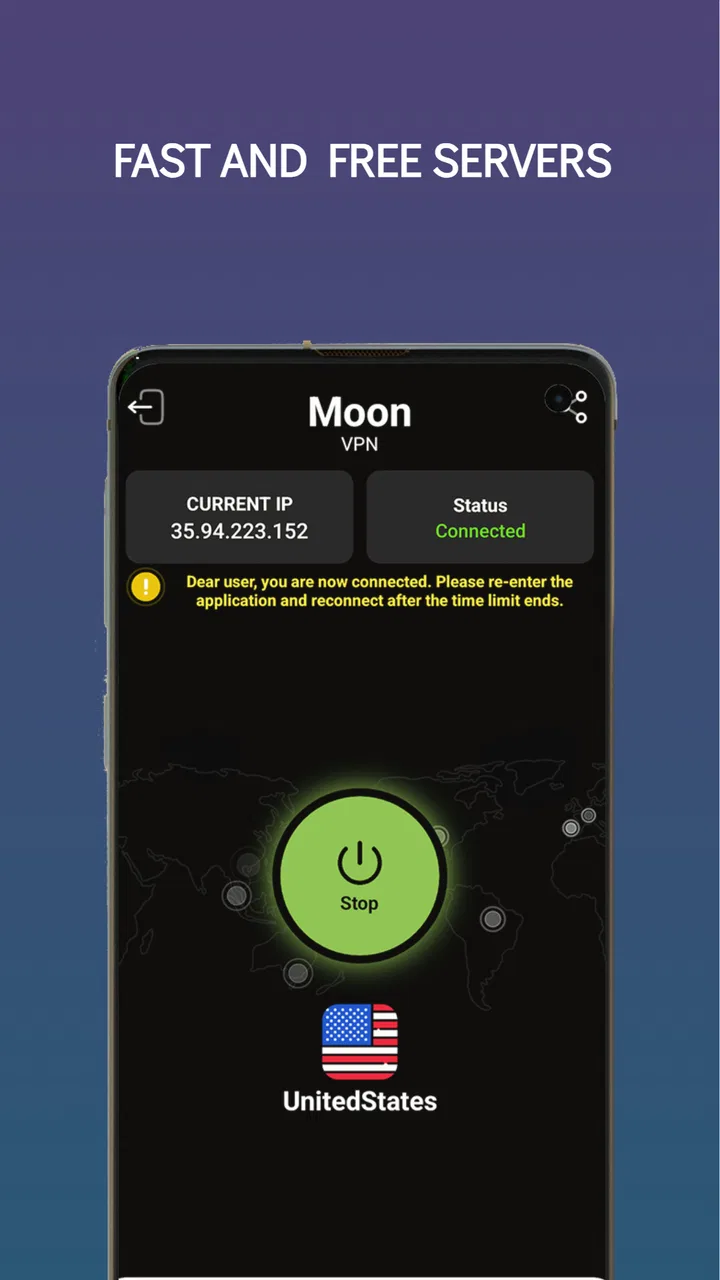
Moon VPN presents itself as a fast and secure VPN with US servers, private browsing, and unlimited access. The important practical point is that its location choice is focused on the United States. That can be useful when your goal specifically involves a US connection, but it is also the first limitation to understand. This is not the most natural choice for someone who regularly needs to appear in several different regions around the world.
The app has built a noticeable user base, with more than a million installs and an average rating of 4.5 from roughly twenty-eight thousand ratings. Those figures suggest that the basic connection workflow works well for many people, although they should not be treated as a guarantee that every network or phone will behave identically. VPN performance is affected by your mobile connection, Wi-Fi quality, distance from the server, and the service you are trying to reach.
Because it is free, Moon VPN is easy to try without making a financial commitment. That makes it particularly approachable for a first-time user who needs a VPN occasionally rather than every day. The trade-off is that a free VPN deserves a more careful privacy mindset: I would avoid treating it as a substitute for strong account passwords, two-factor authentication, software updates, or sensible browsing habits.
The current version is 31.12026m, and the app was released on April 29, 2025. I mention this because compatibility is part of the first decision. On a reasonably recent Android phone, the minimum operating-system requirement should not be a major obstacle, but anyone using an older device should check the system version before expecting installation to work.
Who will get the most from it
I would recommend Moon VPN to someone who wants a low-friction way to try a VPN, especially when a US connection is the main requirement. It can also suit a person who uses public Wi-Fi in cafés, hotels, libraries, or shared workspaces and wants an additional layer between the local network and ordinary browsing. In that situation, the useful habit is to connect before opening email, social media, shopping accounts, or other services that involve personal information.
It is also a reasonable option for occasional travellers. Imagine checking into a hotel, joining its Wi-Fi, and needing to do some routine browsing or access a familiar service. Instead of remembering a complicated sequence of settings, you can open Moon VPN, connect to a US server, and then continue. The meaningful success is not simply seeing a connected status; it is completing the task you opened your phone to do while the VPN remains active.
I would be less enthusiastic about it for a user who wants a broad international server map, highly configurable connection behaviour, or a VPN chosen mainly for demanding streaming, gaming, or business workflows. A US-focused tool can be the wrong fit when your real need is a nearby server in another country. For those cases, a more established alternative with a clearly documented range of locations and advanced controls may be worth considering, even if it is less simple or costs money.
Installing it without overthinking the process
The first setup should be approached in two stages. First, install the app on a compatible Android device. Second, decide what you actually want the VPN to accomplish before connecting. That small pause prevents a common mistake: turning on a VPN without knowing whether you need a US location, safer browsing on a shared network, or simply a quick test of how the connection behaves.
When Moon VPN asks Android to establish a VPN connection, read the system prompt rather than dismissing it automatically. Android displays this kind of confirmation because a VPN can route network traffic through the service. The prompt is not proof that the app is good or bad; it is a reminder that the connection changes how your device reaches the internet. I prefer to make that decision consciously, particularly when using a free service.
Once the app is open, look for the main connection action and the US server choice. The first useful test is deliberately ordinary. Connect while on your usual network, open a familiar website or app, and check whether it behaves normally. Then disconnect and compare the experience. This gives you a baseline for speed and reliability before you depend on the VPN in a hotel, airport, or other less predictable setting.
Do not judge the service only by the time it takes to connect. A VPN can connect successfully and still be inconvenient if pages load slowly, a website repeatedly asks you to verify your identity, or an app refuses the changed network route. The better test is whether Moon VPN lets you complete a normal task without constant interruptions. That is the difference between a connection indicator and a genuinely useful first session.
The first successful action should be practical
For a first-time user, I suggest making the first session a small privacy routine rather than an experiment with sensitive accounts. Join a network you are comfortable testing, connect to the US server, open a browser, and visit a few ordinary pages. If everything loads normally, try one low-risk task such as reading an article or checking a public service page. Then disconnect inside the app and confirm that your browsing returns to its usual behaviour.
This simple sequence teaches three things at once: where the connection control is, how the app behaves when connected, and how to turn the VPN off when it is no longer needed. That last step is easy to overlook. Leaving a VPN active can affect location-sensitive services, local devices, workplace tools, banking checks, and websites that treat a changed network as unusual. I would not leave it running automatically all day unless I had tested the services I use most.
A useful second test is to switch between Wi-Fi and mobile data while paying attention to whether the connection remains stable. You are not trying to produce a laboratory benchmark; you are learning how the app fits your routine. If a page fails only on one network, the issue may be the network itself rather than Moon VPN. If the same problem appears repeatedly after connecting, disconnecting and reconnecting can help identify whether the VPN route is the source of the friction.
For privacy-conscious browsing, I would also combine the VPN with ordinary browser discipline. Use secure websites, keep your browser and Android system updated, avoid downloading unknown files, and do not enter passwords into pages you reached through suspicious messages. A VPN protects a connection path; it does not replace judgement at the destination. That distinction is especially important for beginners who may otherwise expect one tap to cover every online risk.
Confusion that can appear after the first connection
The most common misunderstanding is assuming that a US server means every service will behave as though the phone is physically in the United States. Websites and apps can use several signals, including account details, device settings, stored cookies, GPS, and their own service rules. Moon VPN may change the network route, but it cannot force every app to accept a different location. If a service still shows local content, that does not automatically mean the VPN failed.
Another point worth remembering is that “private browsing” can mean different things to different people. A VPN can reduce what the local network can see about your connection, but the sites and apps you use may still collect information about your account and activity. Private browser mode also has a separate purpose: it generally prevents local browsing history from being retained in the usual way, but it is not the same as a VPN. Using both can address different parts of the privacy problem.
Speed is another area where expectations need to be realistic. Moon VPN’s focus on a US server means that users far from the United States may experience a longer route than they would with a nearby server. Even users in the US can notice changes during busy periods or on weak Wi-Fi. I would disconnect for bandwidth-heavy tasks if the VPN is making them frustrating, then reconnect when privacy on the network matters more than maximum speed.
Some websites may also react to a VPN connection by showing a verification screen, asking you to sign in again, or temporarily limiting an action. This is usually a service-side response to unfamiliar traffic rather than a sign that your phone is damaged. If a site is important, test it before you are in a hurry. You may decide that Moon VPN is helpful for general browsing but inconvenient for a particular account or work service.
There is a practical battery and connection trade-off as well. Any active network tunnel adds another step between your phone and the internet, and maintaining it can be less convenient than browsing directly. I would use Moon VPN selectively: connect for public-network sessions or privacy-sensitive browsing, and disconnect when I am back on a trusted network and need the simplest possible connection. This approach also makes it easier to notice when the VPN is responsible for a problem.
Small habits that make the app more useful
My first tip is to create a “before browsing” check rather than connecting at random. Ask yourself whether the current network is shared, whether the task involves personal information, and whether you specifically need a US route. If the answer to all three is no, a direct connection may be more practical. If the answer to one or more is yes, Moon VPN has a clearer role.
My second tip is to test important apps separately. A browser working correctly does not prove that a banking app, video call, game, or workplace tool will behave the same way. Open each service only after the VPN connection is established, and note which ones react badly. That gives you a personal compatibility map without relying on vague assumptions about VPNs in general.
My third tip is to make disconnection part of the same routine as connection. If you use the VPN to browse on hotel Wi-Fi, disconnect before troubleshooting a casting device, printing to a local printer, or accessing a device on your home network. The changed route can make local discovery less predictable. This is a small detail, but it is one of the reasons a simple on-demand workflow is often better than leaving the VPN active without thinking about it.
My fourth tip is to treat the US server as a purpose-built choice, not a universal default. It can be useful for a US-oriented browsing route, but a nearby server would normally be preferable for latency-sensitive activities if one were available and appropriate. Moon VPN’s simplicity is an advantage when your need matches its focus; it becomes a limitation when you expect it to solve every location or performance problem.
How it compares with ordinary alternatives
The most obvious alternative is using Android without a VPN. That is simpler, often faster, and perfectly adequate on a trusted home network for ordinary tasks. Moon VPN becomes more compelling when you are on shared Wi-Fi or want your traffic to take a US route. The comparison is therefore not “VPN always wins”; it is about whether the added privacy layer and location change are worth the possible compatibility and speed trade-offs.
Another alternative is a paid VPN with a larger server network and more detailed settings. Such services are usually better suited to people who need several countries, predictable performance, specialist support, or control over how connections are made. Moon VPN has the stronger convenience argument for a casual user who wants a free starting point and does not need a long menu of choices.
There are also browser-based privacy tools, but they generally protect only activity inside that browser. Moon VPN is different in purpose because the connection is handled at the device level, so other apps may also use the VPN route while it is active. That broader reach is useful, but it also explains why a VPN can affect apps you were not thinking about. If you only want to limit tracking inside a browser, a browser privacy feature may be more focused and less disruptive.
Finally, a VPN should not be confused with antivirus software, a password manager, or parental controls. Moon VPN belongs in the connection-privacy part of your toolkit. I would pair it with unique passwords, two-factor authentication, careful app installation, and system updates rather than expecting it to provide those functions itself.
My recommendation for a first-time user
Moon VPN is a sensible starting point if you want a free Android VPN with a clear US-server focus and a short path from installation to connection. The app is accessible to a general audience, and its Everyone content rating makes it suitable as an everyday tools download rather than a specialist product. Its strongest quality is that it gives a beginner a concrete action to take instead of burying the main purpose under technical choices.
I would skip it if your main requirement is a wide international network, advanced privacy configuration, or dependable performance for demanding services. I would also avoid using any free VPN casually for highly sensitive work until I had read its current privacy information and tested the behaviour I needed. That is not a criticism unique to Moon VPN; it is simply the responsible standard I apply to any service that handles network traffic.
For everyone else, the best way to judge it is through a controlled first session: install it on a compatible Android device, connect to the US server, complete a normal low-risk browsing task, test one or two important apps, and then disconnect. If that routine feels reliable on your networks, Moon VPN can become a useful on-demand tool. Its real strength is focused simplicity, while its main trade-off is the narrow server choice and the uncertainty that any VPN can introduce into location-sensitive services.
After using it this way, you should have a clear answer about whether it belongs in your daily toolkit. I see it as a practical first step for occasional privacy on shared networks and US-oriented browsing, not as a replacement for a full security setup or a premium VPN designed around broad global coverage. For the right user, that honest scope is exactly what makes the app easy to recommend.
FAQs for Moon VPN
01What platforms support Moon VPN?
Moon VPN is available on both Android and iOS devices, ensuring that users of smartphones and tablets can enjoy secure and private internet browsing. The app is designed to work seamlessly across different operating systems, providing users with the flexibility to protect their online activities regardless of their preferred device.
02How does Moon VPN protect my privacy online?
Moon VPN encrypts your internet traffic, making it difficult for hackers, advertisers, or even your Internet Service Provider (ISP) to track your online activities. By rerouting your connection through secure servers, it masks your IP address and location, providing a safe and private browsing experience.
03Are there any data limits with Moon VPN?
Moon VPN offers various plans, some of which may have data limits. It's important to review the details of each plan before subscribing. Unlimited data options are typically available in premium plans, ensuring you can browse, stream, and download without worrying about hitting a cap.
04Can I access geo-restricted content using Moon VPN?
Yes, Moon VPN allows you to bypass geo-restrictions by connecting to servers in different countries. This enables you to access content that may be restricted in your region, such as certain streaming services or websites, by appearing as if you are browsing from a different location.
05Is Moon VPN user-friendly for beginners?
Moon VPN is designed with an intuitive interface that makes it easy for users of all skill levels to navigate. It provides simple setup instructions and a user-friendly dashboard, ensuring that even those new to VPNs can quickly learn how to use it to secure their online activities.
Pros
- High-speed connections ensure smooth browsing.
- Easy-to-use interface for quick setup.
- Supports multiple devices simultaneously.
- Offers a wide range of global servers.
- Strong encryption for enhanced privacy.
Cons
- Limited free version with fewer features.
- Occasional connectivity drops in remote areas.
- Subscription costs can be pricey.
- Some servers may have slower speeds.
- Customer support lacks 24/7 availability.

Moon VPN
Gallery